2 + 24In Quarto documents, code blocks marked with the name of a language in braces, like {python} or {r}, are included as standard syntax-highlighted code blocks, but they are also executed and their output included after the code itself. The examples here use Python (executed via Jupyter); see Other languages for R.
What is the sum of two and two?

```{python}
2 + 2
```

It is four!
What is the sum of two and two?
2 + 24It is four!
Text output is shown in a non-highlighted code block.
Errors and warnings can be captured and the messages displayed using the cell options error and warning:
```{python}
#| error: true
1 / 0
```
1 / 0--------------------------------------------------------------------------- ZeroDivisionError Traceback (most recent call last) Cell In[2], line 1 ----> 1 1 / 0 ZeroDivisionError: division by zero
One can also create document text in Markdown (or HTML) format from code (cell option output: asis), in which case it makes sense not to show the code (cell option echo: false):
```{python}
#| output: asis
#| echo: false
a = 2
b = 3
print(f'The *sum* of {a} and {b} is {a + b}, their *product*  is {a * b}.')
```
The sum of 2 and 3 is 5, their product is 6.
Many cell options can also be set as document format options.
Rich output, such as tables and plots, can also be embedded. In Python, this uses the mechanisms of Jupyter; for example a table
```{python}
import pandas as pd

df = pd.DataFrame({'a': [2, 1, 3], 'b': [5, 7, 6]})
df
```
import pandas as pd
df = pd.DataFrame({'a': [2, 1, 3], 'b': [5, 7, 6]})
df| a | b | |
|---|---|---|
| 0 | 2 | 5 |
| 1 | 1 | 7 |
| 2 | 3 | 6 |
or a plot:
```{python}
#| fig-cap: Matplotlib plot from data frame `df`.
df.plot();
```df.plot();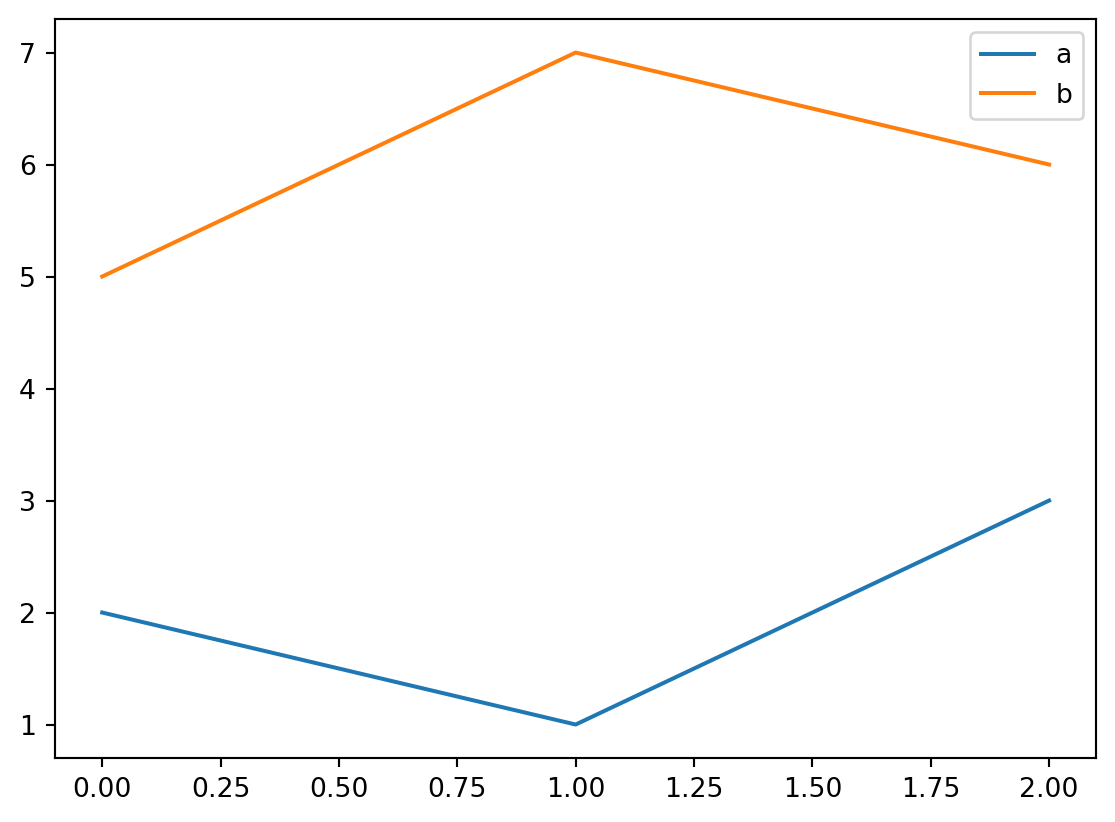
df.Here, fig-cap is a cell option which adds a caption to the figure.
Pandas’ plotting uses Matplotlib by default.
A document uses a single execution engine, which by default is chosen by the language of the first code cell: jupyter for Python (and Julia etc.), knitr for R. The engine can also be set explicitly in the document header, e.g. jupyter: python3 or engine: knitr. Mixing Python and R cells in one document requires the reticulate package; otherwise a document is either a Python or an R document.
The first example above would look like this in R (shown here without execution):
```{r}
df <- data.frame(a = c(2, 1, 3), b = c(5, 7, 6))
df
```
and the plot:
```{r}
#| fig-cap: Plot from data frame `df`.
matplot(df, type = "l")
```
Cell options work the same way in both engines (for example, output: asis and echo: false). Some options only apply to one engine, see the Quarto documentation for Jupyter and knitr cells.
Executing code is the slow part of rendering a project, especially for Python, because a Jupyter kernel has to be started for each document. With the project option
execute:
  freeze: auto
documents are only executed again when their source has changed; otherwise the results stored in the _freeze directory are reused. To force re-execution, delete _freeze or render with --cache-refresh.